About Obby Tower: Only Up!
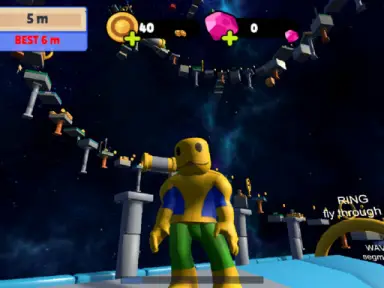
Obby Tower: Only Up! is a 3D parkour arcade game where your main goal is to ascend a massive structure stretching into the sky. Across thirty stages, you will navigate past shifting hazards such as moving conveyors, strong wind currents, launching springs, crushing blocks, and disappearing walkways. If you mistime a leap, you drop straight down. Before tackling the heights, you can practice dodging obstacles in a dedicated Training Hall.
As you jump across floating platforms, keep an eye out for scattered coins and shiny diamonds. Gathering these treasures lets you unlock fun character looks like a frog, cat, capybara, dog, or spider. Whenever a specific obstacle proves too difficult to clear, you have the option to skip past that level and continue your journey toward the clouds.
How to play
- Move using the WASD keys or arrows on PC, or slide the virtual joystick on mobile.
- Look around your surroundings by moving the mouse or swiping across the right half of your mobile screen.
- Leap over gaps using the Space key or the on-screen jump icon.
- Sprint through dangerous areas by holding Shift or tapping the on-screen sprint button.
- Visit the Training Hall first to test each hazard before starting your main climb.
Highlights
- Thirty obstacle-filled levels set high in the sky
- Safe Training Hall to practice navigation before the climb
- Collectible coins and diamonds to unlock skins like Cat, Frog, and Capybara
- Hazardous elements including springs, wind zones, cannons, and vanishing bridges
- Level skip option for tricky jumping sections
FAQ
Is Obby Tower: Only Up! free to play online?
Yes, you can jump straight into the full game on happy-game.net for free through your web browser.
Can I play Obby Tower: Only Up! on mobile devices?
Yes, the game is mobile-ready in landscape orientation with dedicated touch controls for moving, jumping, and sprinting.
How do you control your character on a computer?
Use WASD or arrow keys to move, your mouse to look around, Space to jump, and Shift to sprint.